


















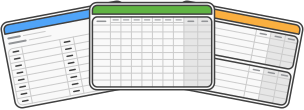
Suitable for Microsoft Excel, Word, PDF & Google Sheets
Free Hourly Time Sheet Template
Hourly’s time sheet templates are free to download and fully customisable. Ideal for hospitality, construction, retail or volunteering, these templates can help you streamline employee payroll, total hours worked, sick leave and vacation.







Trusted by teams worldwide





Free Timesheet Template
Choose the right timesheet template for you
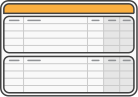
Daily timesheet template
The perfect template to ensure you know how long each employee worked each day. Suitable for full time, part time and casual workers. The table also includes space
for breaks, overtime, sick days and vacation.







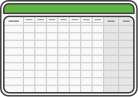
Weekly timesheet template
If your business uses weekly employee timesheets to calculate pay and process invoice data, this is the ideal timesheet for you.
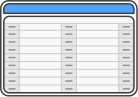
Monthly timesheet template
If your pay period is monthly, this timesheet can help to streamline your payroll. Our timesheet has spaces for 31 entries, which is great for employees who work
one shift per day.
Simple Timesheet Template
How our templates works

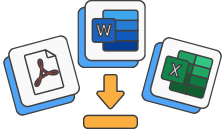
Download your preferred timesheet in your preferred document format.

Fill in employee name, manager, company, date, standard pay rate and overtime pay rate.

After their shift, employees complete the date, job/shift, themes in and out (incl. breaks), and any remaining hours for leave taken during shift.

Employee signs completed timesheet. Managers then calculate total time for payroll and record-keeping.
Timesheet Template PDF
Go paperless, try Hourly
Printable timesheet templates are great, but Hourly offers real-time tracking solutions to all industries with desktop and mobile applications. Automate your invoicing, payroll and reporting with our easy-to-use software.
Try for free

Pros of using paper spreadsheets for timesheets



Simple and accessible for small teams
Paper timesheets are easy to start with—no need for software installation, logins, or a complex setup. Employers can use this template to record employee hours on a daily, weekly or monthly basis
without worrying about compatibility issues. Anyone can pick up a pen, write down start and end times, and total up the work hours.

Low cost option
For small business owners or those managing multiple employees, using paper timesheets can be almost free. Many people pair them with free timesheet templates or even print an excel timesheet
template directly from Google Sheets or Microsoft Word. You can download a pdf template or pdf file version online, making it a free timesheet solution for basic tracking.

Tangible record keeping
Physical records are easy to review and sign, providing a paper trail for payroll records or audits. This can help ensure timesheet compliance and verify that regular hours, overtime pay, and
vacation days are documented correctly.

Ideal for small or offline workplaces
Not every employee has access to digital devices or internet connections. Paper timesheets are practical in warehouses, workshops, or outdoor job sites where connectivity is unreliable. You can
still track time and maintain accurate time entries for different tasks and projects without relying on a timesheet app.

Flexibility and customization
Managers can easily adjust columns for break times, lunch breaks, or sick days to suit their needs. They can use this template to separate regular hours and billable hours, or even list hourly rates
beside each task. With a pen or calculator, they can automatically calculate weekly total hours or totals on a monthly basis for payroll.
Simple and accessible for small teams
Paper timesheets are easy to start with—no need for software installation, logins, or a complex setup. Employers can use this template to record employee hours on a daily, weekly or monthly basis
without worrying about compatibility issues. Anyone can pick up a pen, write down start and end times, and total up the work hours.
Low cost option
For small business owners or those managing multiple employees, using paper timesheets can be almost free. Many people pair them with free timesheet templates or even print an excel timesheet
template directly from Google Sheets or Microsoft Word. You can download a pdf template or pdf file version online, making it a free timesheet solution for basic tracking.
Flexibility and customization
Managers can easily adjust columns for break times, lunch breaks, or sick days to suit their needs. They can use this template to separate regular hours and billable hours, or even list hourly rates
beside each task. With a pen or calculator, they can automatically calculate weekly total hours or totals on a monthly basis for payroll.
Cons of using paper spreadsheets for timesheets
Time consuming and prone to human error
Writing and totalling numbers by hand can be highly time consuming. Without automatic calculation, manual work can easily lead to mistakes—especially when trying to calculate overtime pay, vacation
time, or weekly total hours. This often results in inconsistent payroll data and missed time entries.
Difficult to track and analyze data
Paper systems make it harder to track hours or analyze patterns across projects or employees. There’s no easy way to generate reports, filter different tasks, or visualize productivity compared
to using other tools like digital timesheet apps or project management platforms. For employers, it becomes tough to track time accurately or to see how employees distribute their work hours.
Lacks an intuitive interface or automation
While digital templates often feature an intuitive interface, paper timesheets do not. They cannot automatically calculate totals or flag errors. You have to remind employees to submit time
manually at the end of the week or month, which can slow down the payroll process.
Limited for multiple employees and remote teams
Managing multiple employees across departments or projects becomes complicated. Collecting paper timesheets from remote workers means scanning, emailing, or mailing them, which introduces delays
and lost documents. A timesheet app or google sheets document allows everyone to track time and submit time in real-time, reducing administrative errors.
Storage and compliance challenges
Paper files take up space and can be lost, damaged, or misplaced, making long-term payroll records and timesheet compliance harder to maintain. Over time, it’s more efficient to migrate to digital
solutions that automatically calculate and store all employee hours securely.

Not user friendly compared to digital templates
Compared to a user-friendly excel timesheet template or free timesheet option online, paper timesheets require manual work for every time entry. There’s no automatic calculation or notification
to remind employees to submit time. You’ll spend extra hours verifying totals and reconciling payroll.


Time consuming and prone to human error
Writing and totalling numbers by hand can be highly time consuming. Without automatic calculation, manual work can easily lead to mistakes—especially when trying to calculate overtime pay, vacation
time, or weekly total hours. This often results in inconsistent payroll data and missed time entries.
Difficult to track and analyze data
Paper systems make it harder to track hours or analyze patterns across projects or employees. There’s no easy way to generate reports, filter different tasks, or visualize productivity compared
to using other tools like digital timesheet apps or project management platforms. For employers, it becomes tough to track time accurately or to see how employees distribute their work hours.
Not user friendly compared to digital templates
Compared to a user-friendly excel timesheet template or free timesheet option online, paper timesheets require manual work for every time entry. There’s no automatic calculation or notification
to remind employees to submit time. You’ll spend extra hours verifying totals and reconciling payroll.
Free Printable Timesheet Templates
When paper spreadsheets still make sense


For small businesses that need a simple and free option.
For teams working offline or without regular access to computers.
When you need physical signatures for payroll records or compliance.
For temporary projects where setting up a timesheet app isn’t practical.
You can download a pdf template or print a free timesheet from Google Sheets or Excel to get started quickly. However, if you’re ready to streamline how you track time, consider upgrading to digital
tools that can automatically calculate totals, record time entries, and sync employee hours with your payroll.
Ultimately, paper spreadsheets are simple, but not a perfect solution
Paper timesheets work well for basic setups and quick manual tracking time, but they’re far from the perfect solution for growing teams. As employees take vacation days, log sick days, and handle different tasks,
using a digital timesheet app or project management tool becomes more efficient.
Whether you use a free timesheet template, a Google Sheets tracker, or a timesheet app, going digital helps ensure accuracy, reduce manual work, and simplify payroll processes on a weekly basis or monthly basis.
Whether you use a free timesheet template, a Google Sheets tracker, or a timesheet app, going digital helps ensure accuracy, reduce manual work, and simplify payroll processes on a weekly basis or monthly basis.
Work Timesheet Template
Frequently Asked Questions
Here are the answers to some frequently asked questions:
How long should you keep timesheet records?
In most cases, employers should keep timesheet records for at
least two to three years, depending on local labor laws. In the U.S., for example, the Fair Labor Standards Act (FLSA) requires employers
to retain employee time and pay records for a minimum of two years. Some regions recommend longer—especially if records relate to taxes,
payroll audits, or compliance.
Even if you’re not legally required to keep them that long, it’s good practice to store timesheet data securely for future reference. If you’re using digital time tracking software like Hourly, all your records are automatically saved and backed up—so you’ll always have accurate documentation of hours worked, overtime, and pay periods when you need it.
Even if you’re not legally required to keep them that long, it’s good practice to store timesheet data securely for future reference. If you’re using digital time tracking software like Hourly, all your records are automatically saved and backed up—so you’ll always have accurate documentation of hours worked, overtime, and pay periods when you need it.
Who is responsible for approving timesheets?
Typically, a supervisor, manager, or payroll administrator is
responsible for reviewing and approving employee timesheets before they’re processed for payroll. The goal is to ensure accuracy—confirming
that the hours worked, breaks taken, and any overtime hours align with company policy and labor standards.
Some workplaces also involve employees in the approval process by having them sign or digitally confirm their own time entries before submission. If your team uses Hourly, approvals can be handled in just a few clicks—streamlining the process while maintaining accuracy and transparency.
Some workplaces also involve employees in the approval process by having them sign or digitally confirm their own time entries before submission. If your team uses Hourly, approvals can be handled in just a few clicks—streamlining the process while maintaining accuracy and transparency.
Can timesheets be adjusted after submission?
Yes, timesheets can be adjusted after submission—but only with
proper authorization. Mistakes happen (for example, forgetting to log a break or clocking in late), so most businesses allow edits as long as
they’re approved by a manager or payroll admin.
However, it’s important to document any changes to maintain accurate and compliant time tracking records. Many modern time tracking tools like Hourly automatically keep a record of all edits and approvals, ensuring that your audit trail stays clean, transparent, and compliant with labor laws.
However, it’s important to document any changes to maintain accurate and compliant time tracking records. Many modern time tracking tools like Hourly automatically keep a record of all edits and approvals, ensuring that your audit trail stays clean, transparent, and compliant with labor laws.